Author: Anthony Hill, Solution Architect, CDW UK
Contributor & Reviewer: Tim Russell, Chief Technologist, Office of the CTO, CDW UK
Windows on ARM has crossed the line from curiosity to credible enterprise choice. Copilot+ PC’s launched first with Snapdragon 2 years, a clear indication from Microsoft as to the enterprise suitability for this Silicon. Snapdragon and ARM offer something genuinely different: all-day battery life, a dedicated NPU for on-device AI, always-on connectivity, and a quieter, cooler, lighter device that field workers and executives actually want to carry. Those are real outcomes, and they matter.
But as with any platform shift, the benefits sit alongside a set of less obvious technical hurdles. Having both Tim at the start of this journey and more recently myself running an ARM device as a daily driver, our advice is simple: start with the user, not the silicon. Map who needs what, test the things that matter, and you can capture the upside without surprising your service desk. This guide walks through the five areas that decide whether a Windows on ARM rollout succeeds - application compatibility, performance, drivers and peripherals, virtualisation, and management tooling - and gives you a practical path through each.
It is written to be a point of reference for our teams and our customers, and a piece of collateral we can offer to any organisation weighing up a move to ARM-based Windows 11.
Why Windows on ARM, and why now
Adopting ARM devices offers several compelling advantages. They typically deliver outstanding battery life, letting people work a full day between charges with far fewer plug-ins. Their lightweight, often fan-less design makes for quieter, cooler working - ideal for road warriors, hot-desking and flexible offices. Enhanced security features and improved power efficiency position Windows on ARM as a forward-thinking way to modernise a fleet, with the on-device NPU unlocking AI experiences that deliver productivity into the hands of the users.
The hardware choice has matured too. Microsoft, Dell, HP, Lenovo and ASUS now ship ARM64 devices built around Qualcomm's Snapdragon X processor family. As of June 2026, the buying conversation has moved from a single generation to a two-generation portfolio. Snapdragon X2 Elite and X2 Elite Extreme are Qualcomm's current premium-tier Windows PC platforms, with the X2 Elite Extreme now sitting at the top of the range for ultra-premium devices and more demanding AI, creative and professional workloads. The original Snapdragon X Elite and X Plus remain accurate and widely available, but they are now positioned as the established first-generation tier: proven, more affordable, and still well suited to mainstream enterprise productivity, mobility and Copilot+ PC adoption. The right answer depends on your user personas, budget and workload profile, and as the ecosystem matures, the choice of models will keep expanding.
What NVIDIA’s GB10 tells us about ARM’s direction of travel
The ARM story is also bigger than Qualcomm and Windows laptops. NVIDIA’s recent Grace Blackwell announcements, including the GB10 Grace Blackwell Superchip used in DGX Spark-class desktop AI systems, point to the same wider direction: ARM is no longer just a low-power mobile architecture, it is becoming a serious compute platform for AI, developer workstations and edge-to-desktop workloads. GB10 combines a Blackwell GPU with a Grace CPU built on ARM cores, using a unified memory model to support local AI development, inference and model prototyping in a compact, power-efficient form factor.
For enterprise buyers, the message is not that every user suddenly needs an NVIDIA AI workstation. The message is that the industry’s centre of gravity is shifting. Qualcomm is bringing ARM into mainstream Windows productivity devices, Apple has already normalised ARM in premium client computing, and NVIDIA is now using ARM alongside its GPU stack for local AI and workstation-class scenarios. That breadth matters. It gives IT leaders more confidence that ARM is not a niche bet, but part of a broader architectural move towards efficient, AI-ready, tightly integrated systems.
That does not remove the need for compatibility testing, driver validation or persona-based deployment. It does, however, strengthen the business case for taking ARM seriously now. The same themes keep repeating across Snapdragon X, Apple silicon and NVIDIA Grace Blackwell: better performance per watt, tighter CPU-GPU-NPU integration, more local AI capability and a move away from assuming that enterprise computing must always start with traditional x64 architecture.
Application compatibility: will your software run?
The first question for any ARM rollout is whether your business applications run on the platform. The good news is that Windows on ARM can now run almost any standard Windows app, thanks to a much-improved emulation layer - code-named Prism - and a fast-growing library of native ARM64 applications. Microsoft reports that most apps simply work on ARM without modification, and by early 2026 more than 1,500 of the most popular Windows applications had native ARM versions. In day-to-day use, common productivity software - Microsoft 365, browsers, Zoom, Slack and the like - runs natively or acceptably under emulation. The Windows on Arm Ready Software directory lists compatibility for thousands of titles and is the first place I send anyone starting an audit.
As an early adopter running a Snapdragon X Elite laptop, application compatibility was genuinely a non-issue for general productivity. That said, a few classes of software still need careful checking:
-
Older or niche applications. Legacy line-of-business apps that haven't been updated may fail or run poorly under emulation, particularly where they rely on unsupported instructions or deprecated frameworks. It's rare for mainstream apps, but verify any critical in-house or third-party tools on real ARM hardware.
-
Apps with kernel components. Anything that installs a kernel-mode driver or low-level system service - some VPN clients, security and endpoint agents, certain virtualisation or USB tools, older hardware utilities - cannot be emulated and must be recompiled for ARM64. This is an all-or-nothing wall: if the driver isn't available for ARM, the dependent app is blocked.
-
High-end professional software. Specialised engineering, media and scientific tools can present issues. As of late 2025, some heavy CAD/CAM packages and a few Adobe Creative Suite tools still lacked official ARM support. Many run under emulation (AutoCAD and most Adobe apps, for example) but may be unsupported or feature-limited. Some developer tooling lags too - notably, there is no native ARM64 build of the Microsoft SQL Server database engine for Windows - confirmed in the SQL Server 2025 requirements and known-issues documentation - which affects anyone running local databases. (Note the management tooling has moved on: SSMS 22 is now ARM64-native, but the engine itself is not.) The usual workaround is a containerised engine - SQL Server for Linux or Azure SQL Edge in Docker/WSL2.
Emulation versus native: the direction of travel
The picture keeps improving. Microsoft's ARM64EC (Emulation Compatible) lets developers port large applications incrementally, mixing native ARM and x64 code in a single process. By recompiling the most CPU-intensive modules first, vendors get the biggest performance gain for the least effort - moving from a fully emulated x64 app, through a hybrid, to a fully native ARM64EC build over time. Most major vendors have already released native ARM versions of their flagship software - Microsoft Office, Teams, Chrome, Firefox, Zoom, Photoshop - and many popular utilities, security products and VPN clients now ship ARM64 builds.
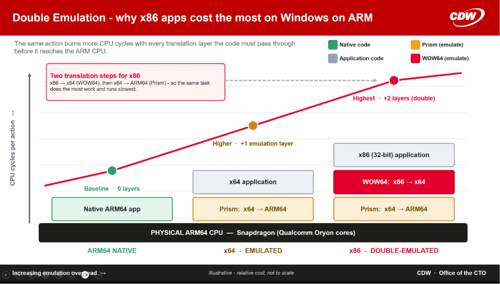
Crucially, Windows 11 on ARM now supports 64-bit x86 emulation, so in principle it can attempt to run virtually any traditional Windows app. Prism has lifted both emulation performance and feature support, letting even some complex x64 applications run on ARM. One thing to watch: anything not ARM64-native runs under emulation and carries a performance cost, and x86 apps are effectively emulated twice - first from ARM64 to x64 via Prism, then from Prism through WOW64 for protected-mode x86 support. Web-filtering agents running under emulation can also affect cloud connectivity performance.
How to approach compatibility
-
Audit and rationalise first. Inventory your software portfolio for ARM64 compatibility ahead of any rollout and flag anything without native support. A persona-based approach works well: standardise ARM laptops for roles built around cloud and productivity apps, and keep x64 for heavy engineering or legacy users. In practice most office software runs fine, and only a small subset of specialised tools needs special handling.
-
Test with representative users. Validate custom add-ins, macros and proprietary apps on real ARM64 devices. Where gaps exist, Azure Virtual Desktop or Windows 365 Cloud PC can stream incompatible apps from x64 VMs as a bridge.
-
Prioritise native security and infrastructure agents. Antivirus, EDR and infrastructure products carry an increased load on the device, so emulating them erodes the very benefits you're chasing. Make these ARM64-native a hard requirement. CDW can help with application discovery and compatibility analysis, and Microsoft's App Assure programme - available through FastTrack - provides additional help migrating custom line-of-business apps to ARM64.
Performance: balancing battery and speed
How do ARM64 laptops actually perform, especially under emulation? There are genuine trade-offs. When running non-native software, and in certain high-end workloads, ARM systems can trail their x64 counterparts. Set expectations accordingly:
-
Emulation overhead. Running x86/x64 apps through Prism costs both performance and energy. Emulated apps generally run slower and use more CPU, memory and battery. For lightweight tools the overhead is negligible; for intensive tasks it becomes pronounced. A complex Excel macro or a large Photoshop filter will finish faster on high-end x64 than on ARM emulating that code, and emulating apps that use advanced instructions such as AVX can mean lower frame rates, louder fans and reduced battery life. Users heavily dependent on non-native apps may not see the full ARM benefit.
-
Raw performance for demanding tasks. Today's flagship ARM processors deliver performance in the ballpark of mid-to-high-range laptop CPUs for common tasks. But for extremely heavy workloads - large 3D renders, complex engineering simulations, AAA gaming, intensive data analysis - peak performance can be lower. ARM emphasises efficiency over sheer throughput, and current ARM laptop GPUs are generally weaker than high-end discrete x64 GPUs. An ARM device is not the right pick as a CAD workstation or for compiling very large codebases; those still favour workstation-class x64 machines.
-
Perceived performance. For typical office and web workloads, well-optimised ARM devices feel snappy and responsive. With native or web apps, many users can't tell the difference from a comparable Intel laptop - except the ARM device runs cooler and lasts longer. Bottlenecks show up in the edge cases: legacy apps, heavy multitasking of emulated software, high-end media work. And the gap is closing fast - each Snapdragon generation narrows it, and Microsoft's Copilot+ AI features tie directly to the ARM NPU, giving future devices capabilities some x64 PCs lack.
To manage these trade-offs:
-
Prioritise native apps. Always deploy ARM64 (or web) versions where they exist for the best speed and battery life. The more your portfolio modernises towards SaaS, web and Universal Windows apps, the less these issues matter.
-
Scope the heavy roles to x64 or the cloud. For users who need heavy local processing, equip them with high-performance x64 machines or offload to the cloud. A clear policy - ARM as standard for productivity and light creation, x64 mobile workstations for CAD and heavy content creation - pre-empts dissatisfaction.
Educate users that an uncommon x86-only app may bring a performance hit and shorter runtime; in many cases the impact is small, but managing expectations is key. During any pilot, track feedback with an ARM64-native Endpoint Analytics or DEX tool - measure battery life and app responsiveness against your real workload mix so you have data to justify the move (for example, 25–50% better battery for field workers against perhaps 10% slower rendering for one specific app, which may be a perfectly acceptable trade).
Drivers and peripherals: the compatibility you can't emulate
Applications can be emulated; drivers cannot. Windows on ARM requires native ARM64 drivers for all hardware and kernel-level software. If your organisation relies on equipment or software using a custom driver that hasn't been recompiled for ARM, it will not work properly on an ARM laptop. Three areas need attention:
-
External devices and accessories. Many older or specialised peripherals - printers, scanners, label printers, industrial devices, docks - may lack native ARM64 drivers. Basic functions can survive on generic class drivers (an older printer may still print) but advanced features can fail. All-in-one printers are the classic example: printing works through the built-in driver, while the vendor's scan utility refuses to install. Audit your important peripherals, especially legacy or specialised hardware.
-
Kernel-mode software. Endpoint security suites, VPN clients, disk encryption and anything else installing a kernel driver must have native ARM64 support. Some VPN and endpoint agents initially didn't, causing hard failures. Many vendors have since ported their agents, but verify every critical agent - antivirus/EDR, VPN, DLP - before deploying. Without an ARM driver, the software simply won't run.
-
Docking and connectivity. ARM64 laptops typically use USB4 rather than officially supporting Thunderbolt 4. USB4 is largely similar, but some Thunderbolt peripherals - certain docks, eGPUs - may not be fully compatible. Some docks work flawlessly; others have non-functional ports. I hit a stubborn issue routing audio through an HDMI KVM switch that I never fully resolved - though newer USB4/Thunderbolt standards are steadily improving the picture. Test any critical docking and multi-monitor setups before you commit.
The ARM64 driver ecosystem is expanding daily, if more slowly than applications. Most major OEMs now provide ARM drivers for built-in components, and by the end of 2025 more common business peripherals - newer printers, scanners and conferencing devices - were shipping with ARM64 support. Older, low-volume devices remain hit-or-miss. Before any large-scale rollout, do your driver due diligence:
-
Compile an inventory of essential peripherals and software that need drivers - headsets, webcams, smart card readers, specialised input devices, printers.
-
Check vendor documentation or support forums for each item's ARM compatibility status.
-
Engage vendors directly - some provide beta ARM drivers on request or have published timelines. CDW can support here.
-
Where no ARM support exists, plan workarounds - for example, a network print server or remote desktop for a printer whose software won't run on ARM.
-
Prefer officially supported USB-C/USB4 docks and test them; avoid reliance on unsupported Thunderbolt devices. Consider refreshing aging peripherals as part of the rollout, favouring vendors with cross-platform drivers.
-
Ensure critical kernel-level software (security, VPN) has an ARM64 version. Most leading enterprise vendors have updated, but verify - and if a needed tool lacks support, press the vendor or delay moving those systems to ARM.
Virtualisation and emulation limits
Can you virtualise or emulate x86 environments on ARM? Only partly, and this catches developers and IT pros out. Windows 11 on ARM includes Hyper-V, but it can only host ARM-compatible guest images - not x86/x64 VMs - because there's no built-in binary translation at the hypervisor level. You cannot spin up a standard x86 Windows VM on an ARM device the way you would on x64. Third-party hypervisors such as VMware Workstation and VirtualBox historically didn't support ARM Windows hosts either. The area is evolving but still trails x64.
-
Local VM usage. Engineers needing multiple local test VMs won't be able to run x86 VMs on ARM64 - only ARM-native guests such as Linux ARM64 or Windows 11 ARM. That's a real limitation for any workflow built on local virtualisation of legacy systems. Cloud-based VMs, or retaining some x64 workstations, are the practical answers.
-
Emulators and containers. Docker on Windows ARM64 runs ARM-compatible container images by default; running x64 images needs emulation that is slow and not officially supported. Android and older device emulators may not run unless updated for ARM. Review any dev/test tooling that depends on endpoint virtualisation or emulation.
-
Virtual desktop infrastructure. Where local containerisation isn't an option, an ARM device makes an excellent VDI client - Windows 365, Azure Virtual Desktop or VMware Horizon all work without issue. This is Microsoft's recommended route to legacy x86 environments.
There has been progress on lightweight x86 container support via WSL using QEMU, but performance is limited, and Hyper-V on ARM is improving mainly to support WSL2 and ARM-based dev/test VMs rather than legacy x86. The pragmatic strategy is cloud-first: lean on Azure Cloud PCs for heavy x86-only workloads while the ARM PC serves as the access point. Be clear that ARM64 devices cannot seamlessly replace x64 for every virtualisation scenario - fill the gap with VDI or remote labs, and consider keeping x64 machines for IT and development roles that depend on local virtual labs.
Management and tooling: deploying ARM at scale
A less visible but important challenge is that some enterprise management, deployment and support tools need updates to support Windows on ARM properly. Early adopters hit snags in software distribution, imaging and device policy because the ecosystem assumed x86/64 by default. By 2025–2026 most Microsoft and major third-party solutions have added ARM support - but verify it in your own environment.
In-band management
Microsoft Intune originally had no straightforward way to target ARM64 devices with Win32 app packages, forcing custom detection-script workarounds. That was resolved in mid-2025: Intune now lets you specify ARM64 as a target platform for app deployments. Make sure your team is using it. Likewise, Configuration Manager (SCCM) didn't fully support OS Deployment for ARM until the 2403 release in spring 2024; current ConfigMgr can image ARM64 devices, but it needs updated boot images and drivers.
Out-of-band management
For out-of-band endpoint management, Qualcomm Snapdragon Guardian introduces hardware-based security and management for ARM devices. Guardian lets IT teams monitor, manage and remediate endpoints remotely - even when the OS is compromised or offline - which is invaluable for responding to malware or device theft without relying on in-band tools that need a working OS. For enterprises, that means the ability to push updates, enforce policy and troubleshoot regardless of device state, reducing downtime and strengthening compliance with a hardware-backed, future-proof approach. Qualcomm Snapdragon Guardian is available as dedicated hardware in the second-generation Snapdragon X2 Elite platform only.
Manual deployments
Microsoft provides a Windows on ARM ISO for manual installation, but extra steps are needed. Standard imaging tools such as RUFUS won't work straightforwardly, because NTFS isn't supported for the boot media - the USB drive must be FAT32, which caps the WIM file at 4GB, so a custom image has to be built and split into multiple 4GB files.
-
OEM driver packs. The Microsoft ISO doesn't include base ARM64 driver support, so you must integrate OEM-specific driver packs into the image before installation. This adds time to any gold-image build - factor it into your schedule, or avoid gold images altogether.
-
Autopilot. With modern cloud provisioning - Windows Autopilot plus Intune - ARM devices are handled much like x64. If you rely on older imaging or on-prem deployment, update those tools to versions that recognise ARM64 clients.
-
Endpoint security and monitoring agents. Confirm ARM64 versions exist for any third-party RMM, asset inventory, backup or encryption-management agent. Microsoft's own tools - Defender, the Configuration Manager agent - are ARM-native now, so devices enrol and manage like x64 endpoints. Avoid niche tools that haven't been updated, or plan to replace them.
-
Support and troubleshooting. Some processes need minor adjustment: recovery and safe mode differ on ARM (UEFI-only, no legacy BIOS), and WinPE for ARM64 runs only ARM binaries - so x64 utility boot sticks won't work without ARM versions. Train staff on ARM-specific procedures such as UEFI-only boot and ARM64 BitLocker recovery, and check that internal scripts are compatible. Most remote-support tools - RDP, Quick Assist, Teams screenshare - work identically.
Broadly, Microsoft has worked to make managing Windows 11 on ARM the same as on x64: Entra, Intune, policy and device-compliance all apply normally. Key improvements have landed - Intune ARM64 app deployment, ARM64 WinPE in MDT and ConfigMgr - and forthcoming Windows 11 releases are pitched as bringing full parity in management and security across ARM and x64. Most mainstream management vendors are updating their platforms as part of supporting Windows 11 generally, but it's still wise to check compatibility matrices for every critical tool in your stack. Before a large rollout:
-
Pilot your deployment and management workflows with a group of ARM devices first.
-
Confirm enrolment (Entra join + Intune, or hybrid join) behaves as expected, and deploy your standard apps to an ARM test machine to flush out any that fail.
-
Keep your Microsoft 365 infrastructure current - Conditional Access, BitLocker and Windows Update for Business all support ARM, but make sure compliance policies don't inadvertently block ARM machines because of a missing or differently-named agent.
If a truly critical tool has no ARM support, you may need to delay ARM for those specific scenarios or find an alternative - but in most cases the gap can be closed through vendor updates or a more modern management approach. Finally, brief your support teams on the differences, especially around imaging and recovery, so they're ready to help end users from day one.
The security and resilience dividend
It's worth framing an ARM move in the wider context of Windows 11 security and resilience. These devices are secured-core capable by design, with hardware-backed protections, virtualisation-based security and a Zero Trust posture that aligns with where Microsoft is taking the platform. Pairing ARM hardware with modern cloud management - Intune, Autopilot, Conditional Access and rapid recovery tooling - moves an organisation away from fragile legacy imaging towards a resilient, recoverable, cloud-first estate. For customers building a business case, the battery and mobility gains are the visible win; the underlying security and resilience uplift is the strategic one, and it maps directly onto Microsoft's current resilience and modern-work investment priorities.
Bringing it together
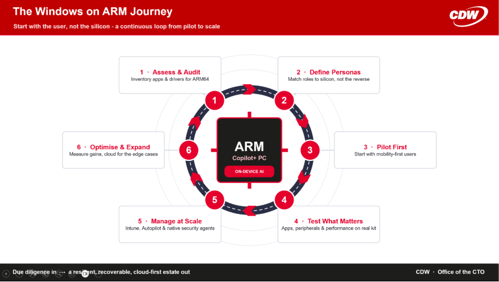
Organisations can build a roadmap for ARM adoption that maximises the benefits while managing the risks. Start with small pilots focused on the roles that gain most - field sales, executives, educators, anyone who values mobility and long battery life - and keep a backup plan for any incompatible workloads. Audit your applications and drivers, decide your personas, test what matters, and lean on the cloud for the edge cases. With careful management and a little vendor cooperation, Windows on ARM can be integrated into the enterprise without compromising core productivity. The path takes due diligence, but the payoff is substantial as ARM-based Windows 11 matures into a mainstream enterprise platform - and the organisations that prepare now will be the ones ready to take advantage.
Frequently asked questions
Will my business applications run on Windows on ARM?
Most will. Common productivity software runs natively or under the Prism emulation layer, and by early 2026 over 1,500 popular Windows apps had native ARM64 versions. The exceptions to check are legacy line-of-business apps, anything with kernel-mode drivers (some VPN and security agents), and a handful of high-end engineering and media tools.
What's the difference between Snapdragon X2 Elite Extreme, X2 Elite, X Elite and X Plus?
Snapdragon X2 Elite Extreme is now the flagship tier, aimed at ultra-premium devices and heavier AI, creative and professional workloads. Snapdragon X2 Elite is the current premium tier for high-performance thin-and-light Windows PCs. The original Snapdragon X Elite and X Plus are still valid options, but they are now first-generation Snapdragon X Series devices: X Elite remains a strong established-performance choice, while X Plus is better positioned for mainstream productivity, efficiency and value-led deployments.
Can I run x86 virtual machines on an ARM laptop?
No. Hyper-V on ARM hosts only ARM-compatible guests, not x86/x64 VMs. Use Windows 365, Azure Virtual Desktop or VMware Horizon to reach legacy x86 environments from an ARM device.
Do my printers, docks and peripherals need special drivers?
Yes. Windows on ARM needs native ARM64 drivers and cannot emulate them. Basic functions may work on generic class drivers, but advanced features can fail. Audit critical peripherals and confirm ARM64 driver availability before rolling out.
Can ARM devices be managed with Intune and Configuration Manager?
Yes. Intune supports ARM64 as a target platform for app deployment (from mid-2025), and Configuration Manager supports ARM OS deployment from the 2403 release. Entra, Conditional Access, BitLocker and Windows Update for Business all apply normally.
Who should get an ARM device first?
Roles built around cloud and productivity apps that value mobility and battery life - field sales, executives, educators and flexible/hot-desking workers. Keep x64 machines for CAD, heavy content creation, large software builds and roles that depend on local virtual labs.
CDW can support application discovery, compatibility analysis, driver due diligence and pilot design for Windows on ARM adoption. To discuss a readiness assessment, speak to your CDW account team.
CDW can support application discovery, compatibility analysis, driver due diligence and pilot design for Windows on ARM adoption. To discuss a readiness assessment, speak to your CDW account team.
Contributors
-
 Tim Russell
Chief Technologist - Modern Workspace