For the past few weeks I’ve been travelling and working with Microsoft’s latest Surface Pro, the 5G model; running Intel’s latest Core Ultra silicon (the new Panther Lake generation), with a built-in eSIM - and rather than let it sit on a desk, I took it somewhere that would properly stress-test it: Microsoft’s Redmond campus, for this year’s Windows Executive Partner Advisory Council (EPAC). Several thousand air miles, a run of back-to-back sessions, and a fair amount of working from planes, trains and departure lounges later, I have a verdict. This is a reliable, powerful and genuinely well-designed piece of kit, and I’m gutted I have to give it back. Through my journey, and out of the EPAC, one thing that changed was how I think about where the hardware ends and the software begins.
Built for the way we actually travel
Let me correct one assumption up front: this isn’t a featherweight, and I wouldn’t pretend otherwise. There’s genuine weight to it - you’re nearer 1.2 kg once the keyboard is on - but it’s the reassuring kind, a solid heft packed into a confined, compact package rather than dead bulk. The materials reinforce the impression: the hard, brushed-aluminium case is offset by a keyboard wrapped in smooth, soft-touch Alcantara, a deliberate tactile counterpoint. The result is a device that feels reassuringly solid but flexible, not lightweight - and it’s that form factor, more than any number on a spec sheet, that works in your favour when space is tight.
The detachable keyboard, an optional upgrade, is the quiet hero here. This is the Surface Pro Flex Keyboard - the one Surface keyboard that keeps working when you pull it off the tablet, over Bluetooth Low Energy - so I’m not tied to keeping the two halves physically clipped together. That sounds like a small thing until you’re somewhere with almost no room to work - at which point it becomes the whole point. My daily Surface Pro has the detachable keyboard, not the Bluetooth version, and having tried both the one that works disconnected delivers a massive benefit.
My favourite moment came at 38,000 feet, I wedged the Surface itself into the gap at the back of the seat in front, detached the keyboard, and dropped it onto my lap table. On the cramped confines of a plane - and later a train - that flexibility turned dead time into working time. Amusingly, Microsoft pitches the Flex Keyboard for exactly this - “even in cramped spaces, like an airplane seat” - and here, the marketing matched the reality.
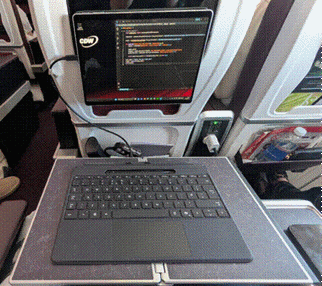
Working at 38,000 feet - screen wedged into the seat-back, keyboard detached in front.
The pen - and an honest word on OneNote
The pen and stylus experience is excellent, and whiteboarding, in particular, is ace. Sketching an architecture on the fly, marking up a diagram, thinking out loud in ink - it feels natural and responsive, and it’s become my default way of capturing ideas in the moment.
I’ll be candid about the one area that used to frustrate, but recently Copilot has revolutionised. OneNote as a handwriting tool, the inking there could feel laggy, enough that I reach for the whiteboard instead when I want to write by hand. Now, however, is the ability to write freely and with a single prompt ask copilot to convert handwritten notes to a textual summary including a summary.
Connectivity that simply works
The built-in eSIM support and 5G connectivity mean I’m online the moment I power on - no hunting for a hotspot, no tethering dance, no captive-portal wrangling in an airport lounge. For a device whose whole purpose is to keep you productive on the move, always-on connectivity out of the box is the feature that quietly underpins everything else.
Setting the eSIM up was refreshingly undramatic - no more involved than adding a Wi-Fi network. Once it was done, it simply worked wherever I landed: I got real work done on the bus out to Redmond, on the train from the airport and - this being Seattle - in the coffee shop in between. Seamless, reliable and simple - which is exactly what I need from a device in my role.
Plugging into external equipment was equally painless. I’ve lost count of the laptops that stumble over the hand-off between USB-C, USB4 and Thunderbolt the moment you connect an external screen - this one, with its two genuine Thunderbolt 4 ports, didn’t miss a beat. Displays, docks and peripherals just came up, first time, every time. It’s almost as if, because Microsoft owns both the operating system and the hardware, the usual hardware and driver challenges simply aren’t there.
There’s a reason for that, and I was reminded of it in Seattle. I had the chance to meet Pavan Davuluri, one of Satya Nadella’s senior leaders, who owns both the Windows and the Surface workstreams. When a single organisation is accountable for the OS and the hardware, the driver quirks and port arguments that have been seen in other devices tend to disappear. Microsoft’s renewed focus on reliability and driver quality - its Windows Resiliency Initiative - only reinforces the point, and on Surface, hardware and operating system already feel tightly, deliberately aligned.
A microphone that earns its keep
A capability I hadn’t expected to single out is the microphone - or rather the pair of far-field Studio Mics. At the recent Microsoft Surface event in London, they were shown transcribing a presentation delivered in a mini-auditorium, and caught very nearly 100% of what was said, accurately, from across the room. For anyone who has ever tried to rebuild a session from half-remembered notes, that is a real unlock: the post-event write-up almost does itself. And the detail that makes it more than a neat demo is that the recording and the eventual transcription can both be done on the device itself - this is a Copilot+ PC, with an NPU built for exactly this - so there’s no cloud service in the loop and nothing leaving the room.
The real surprise: running AI locally
Where the Surface genuinely surprised me was in how much AI I could run entirely on-device. I installed Ollama and a handful of other local models to see how far I could get with nothing going to the cloud - and the results were better than I expected.
Starting from a few text prompts, I built an avatar of myself, layered on text-to-speech, and finished with a talking avatar - the entire pipeline running on local language models, on the device, with no external service in the loop. As a demonstration of what a well-specified portable machine can now do offline, it was hard to beat.
The most useful example, though, was the simplest. I asked a local model to generate code for an ESP32 project, and it produced working C#, Python and JavaScript files - all offline (the C# via .NET nanoFramework, which runs on the ESP32). That was the quickest of everything I tried and, potentially, the most valuable: real, private, on-device AI assistance with no connectivity required. For anyone thinking about where enterprise AI is heading, that combination - capable local models on capable local hardware - is worth paying attention to
.
The kit on test - and two lessons in local AI
For the record, here’s exactly what I was running - because the configuration matters more than usual once you start pushing local AI at it:
|
Processor |
Intel Core Ultra 5 335 @ 2.20 GHz |
|
Architecture |
Panther Lake - Intel Core Ultra Series 3 |
|
Memory |
32 GB LPDDR5X @ 6,800 MT/s |
|
Graphics |
Integrated Intel Xe3 - 128 MB dedicated video memory |
|
On-device AI |
NPU rated around 47 TOPS - a Copilot+ PC |
|
Storage (as tested) |
256 GB SSD (≈238 GB usable) |
|
Connectivity |
5G (eSIM + nano-SIM), Wi-Fi 7, two Thunderbolt 4 ports |
A quick aside on reading the silicon, because it caught me out too: with Intel’s Core Ultra branding, the generation lives in the number, not the name. The hundreds digit is the tell - 1xx is Meteor Lake (Series 1), 2xx is Lunar and Arrow Lake (Series 2), and 3xx, like my 335, is the brand-new Panther Lake (Series 3), Intel’s first 18A-process laptop silicon. If you’re speccing these, read the number, not just the “Core Ultra 5” on the badge.
The first lesson is the one that genuinely surprised me. For all the “47 TOPS, Copilot+” billing, my local models never actually ran on the NPU. They ran on the CPU, with some help from the integrated graphics, while the neural engine sat idle. If you’re buying one of these expecting it to accelerate your local LLMs, here’s why it doesn’t - at least not yet:
• The tools don’t target it. Ollama - and the llama.cpp engine beneath it - run on CPU and GPU; they have no NPU path. Driving the NPU needs a different, vendor-specific stack (Intel’s OpenVINO, ONNX Runtime with an NPU provider, Windows ML), which off-the-shelf local-LLM tools simply don’t use.
• NPUs want fixed shapes; LLMs are dynamic. NPU compilers need static tensor shapes, but language models work on variable-length sequences. In practice that’s a hard incompatibility - a model must be specially re-exported and re-quantised to run on the NPU at all, not the ready-made files you pull from Hugging Face.
• Generation is memory-bound, not compute-bound. Producing tokens one at a time is limited by how fast the weights stream from memory, not by raw maths - so the NPU’s headline compute figure doesn’t help where the bottleneck is bandwidth. TOPS is not tokens per second.
• Even when forced onto it, the NPU isn’t faster. Independent testing has NPU language-model inference matching or trailing the CPU on generation speed, with a hefty one-off cost to compile the model first. No practical win for interactive use, yet.
• It isn’t what the NPU is for. The neural engine is built for sustained, low-power, always-on AI - live captions, Windows Studio Effects, background noise suppression, camera effects - not bursty, heavyweight generative models.
None of this is a knock on the hardware - the NPU is doing real work; it’s what powers the very on-device transcription I raved about earlier. It’s simply not where a language model you download yourself runs today. The headline TOPS figure is real, but plan for the CPU and integrated GPU to do the heavy lifting on local LLMs - and expect that to shift as the tooling matures.
The second lesson is more mundane, but it bites sooner: 256 GB fills up fast. Once I started pulling language models down from Hugging Face and the like, the SSD vanished alarmingly quickly - I ran out of disk space mid-experiment and had to stop and optimise, pruning models and being far more deliberate about what I kept on the device. If on-device AI is your reason for buying, treat storage as a first-class decision: 256 GB is fine for the OS and apps, but local models are large and multiply fast. I’d spec 512 GB or 1 TB from the outset.
Why the NPU is critical anyway - it’s the OS’s AI engine
So if the NPU won’t run my downloaded models, is it wasted silicon? Far from it - I’d simply been asking the wrong question. The NPU isn’t there to run the AI you bolt on; it’s there to run the AI the operating system itself ships. And that is where it becomes strategically important.
Windows increasingly bakes AI straight into the platform, and those features are built to run on the NPU: the Studio Effects that tidy up your camera on every call, live captions with real-time translation, the on-device transcription I praised earlier, smarter local search, Recall and the other Copilot+ capabilities. These are exactly the workloads a neural engine is designed for - sustained, low-power and always-on - so they can run continuously in the background without taxing the CPU, the GPU or the battery.
This is where Microsoft owning the whole stack pays off again. By setting the Copilot+ bar at 40-plus TOPS, Microsoft gives itself a guaranteed floor of on-device AI to build against, then ships Windows features co-designed for that silicon and exposes it to developers through Windows ML and the Windows AI APIs. The NPU is critical not because it runs your ad-hoc LLM, but because it’s the engine the OS’s own intelligence runs on - privately, on the device, by default. It’s the same joined-up hardware-and-software story that runs through this whole piece, just one layer down.
I’ve started making that visible with Microsoft’s own AI Dev Gallery - a Windows app of local-AI samples built on those same Windows AI APIs, which lets you run models across the NPU, GPU or CPU and watch which one does the work.
Proof, from the road. I ran its Paraphrase sample over the first two paragraphs of my own CDW bio - 888 characters - with Task Manager open. The Intel NPU’s compute graph spiked, around 3 GB of NPU memory came into play, and the GPU stayed flat at 0%: the model ran on the neural engine and returned the rewrite faster than I could read it. It’s the same class of task - rewriting text - as the local LLM that ignored the NPU earlier; the only thing that changed is the stack. Go through the Windows AI APIs and the NPU does the work; bolt on your own runtime and it doesn’t.
There’s more to come - I’ll be running the vision, speech and image-generation samples to map the full split across NPU, GPU and CPU, and I’d love to put the same battery of tests through the next Arm-powered Surface Ultra to see how a different silicon path handles it. If Microsoft’s coherence really does hold across architectures, that will be the proof. I can’t wait.
The verdict
Six weeks and one demanding trip in, the theme that keeps coming back is coherence. Individually, the reassuringly solid build, the Bluetooth keyboard, the pen, the eSIM and the effortless external connectivity are all good. Together - and because the same company builds the silicon-adjacent hardware and the OS that runs on it - they add up to something greater than the sum of the parts. The barriers you may learn to work around on other machines simply aren’t here.
For mobile knowledge work - the kind a lot of us do, from planes, trains, lounges and someone else’s meeting room - this is a device I’d happily put back in my bag tomorrow.
What this means for IT leaders
Stepping back from the travel diary, here’s how I’d frame the Surface Pro 5G for anyone weighing it for a fleet rather than a single bag:
• Vertical integration pays off operationally. One owner for the hardware and the OS means fewer driver and peripheral surprises at scale - the coherence I felt on one device shows up as lower support noise across a fleet, and it aligns with Microsoft’s Windows Resiliency Initiative.
• It’s enterprise-ready by default. Secured-core, the Pluton security processor, TPM 2.0, BitLocker and Windows Hello, all managed through Intune and Autopatch - the security and manageability story is already there. The question is fit, not readiness.
• On-device AI is the strategic headline - but govern it. Local models mean privacy, offline capability, and lower latency and cloud cost. The flip side is governance: model provenance, data-loss prevention, and shadow-AI risk. Enable the capability deliberately, not by accident.
• Know which silicon you’re specifying. The Surface Pro comes in both Intel (x86) and Snapdragon (Arm) variants. The demo unit I had was powered by an Intel Core Ultra, the daily I use is Arm powered; for me compatibility wasn’t a question, everything worked, BUT if you opt for the Snapdragon (Arm) variant, test your application estate against its Prism emulation first. Either way, factor in eSIM provisioning across carriers and real-world cellular battery life.
On cost, the shape matters more than the number. I metered a real task - paraphrasing an 888-character passage. Averaged across the major cloud services it works out at roughly £0.30–£0.35 per thousand runs (a few hundredths of a penny each); on the Surface’s NPU the marginal cost is effectively zero - a rounding error of electricity on hardware you’ve already bought.
One request is trivially cheap either way; the difference is structural.
Cloud AI is opex that scales linearly with every request, while on-device AI is capex you’ve already paid. At a few million AI actions a year across a team, that’s a cloud bill in the thousands of pounds versus an on-device bill that stays flat at about zero - with the data never leaving the device.
Net: a device I can recommend with conviction - provided the on-device AI capability is matched with the right guard-rails, and the Arm question is tested against your own application estate.
Contributors
-
 Tim Russell
Chief Technologist - Modern Workspace